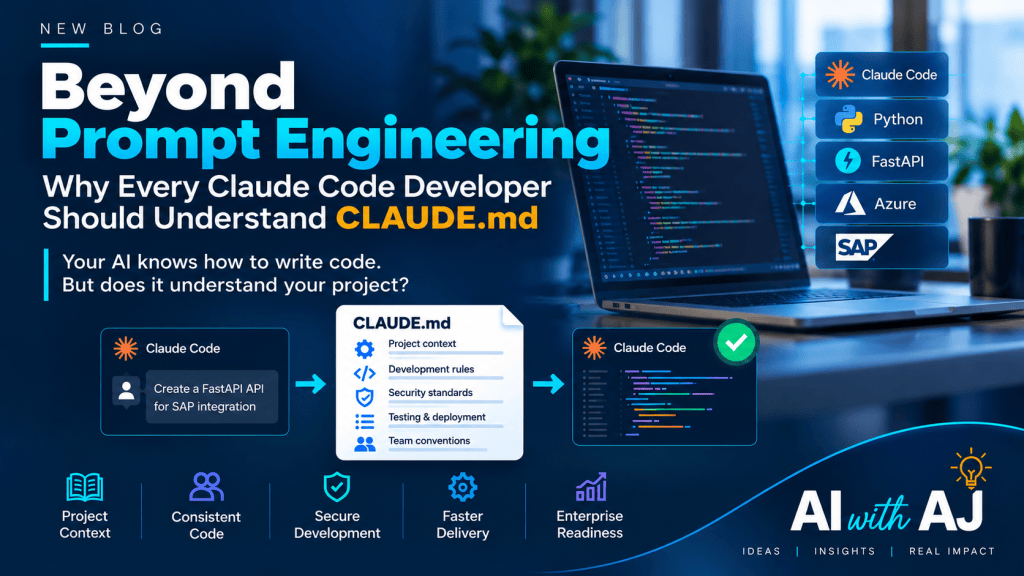
For the last few years, we have spent considerable time learning how to write better prompts for AI.
Be specific. Provide examples. Define the expected output. Give the model a role.
All useful.
But something interesting is happening in AI-assisted software development.
Developers are discovering that even the most capable AI coding assistant can struggle when it doesn’t understand the project it is working on.
Your architecture. Your coding standards. Your dependencies. Your testing conventions. Your security requirements.
The problem may not be the intelligence of the AI model. It may be the context we provide to it.
And this is where a simple Markdown file called CLAUDE.md becomes surprisingly important.
Your AI Knows Python. But Does It Know Your Project?
Imagine you are developing an enterprise application using Python, FastAPI, Azure SQL and SAP APIs.
You ask Claude Code:
“Create a new API to retrieve purchase order status from SAP.”
Claude can generate Python code, define an API endpoint and suggest integration logic.
But does it know that your organisation requires all SAP integrations to use an existing API wrapper?
Does it know that credentials must be retrieved from Azure Key Vault?
Does it know your team’s naming conventions, error-handling patterns or testing requirements?
Not necessarily.
Without this context, AI may generate technically valid code that doesn’t fit your enterprise architecture.
The code works. But it isn’t necessarily the code your organisation wants.
Enter CLAUDE.md — A Small File with a Big Responsibility
Claude Code supports a special Markdown file called CLAUDE.md, which provides persistent instructions and project context.
Developers can place it in the project root directory, allowing Claude Code to discover relevant guidance when working in that project.
Think of it as an onboarding document for your AI coding assistant.
Instead of repeatedly explaining the same architectural decisions and development standards in every conversation, you maintain them in a version-controlled file.
For example:
# Project: Procurement AI Platform## Technology Stack- Backend: Python / FastAPI- Database: Azure SQL- Integration: SAP REST APIs- Hosting: Azure Container Apps## Architecture Rules- Reuse existing SAP API wrappers.- Separate business logic from API routes.- Follow existing authentication patterns.- Do not introduce new frameworks without approval.## Security- Never hardcode credentials.- Use Azure Key Vault for secrets.- Validate all external inputs.## Development Standards- Follow existing naming conventions.- Add unit tests for new functionality.- Run pytest before submitting changes.- Document any breaking API changes.
Now, when Claude Code works on the project, it has a clearer understanding of the team’s expectations.
It can use those instructions when planning changes, generating code and reviewing its work.
Of course, CLAUDE.md does not guarantee that every instruction will be followed perfectly. Automated tests, code reviews and security controls remain essential.
But it establishes something valuable:
A shared understanding of how software should be developed within the project.
From Prompt Engineering to Context Engineering
This is where I believe the bigger story begins.
Prompt engineering focuses on improving the instructions we give AI for a particular task.
Context engineering focuses on ensuring AI has the relevant information, constraints and tools to perform that task correctly.
Consider the difference.
Prompt Engineering:
“Write a FastAPI endpoint to retrieve SAP purchase orders.”
Context Engineering:
“Write a FastAPI endpoint within our existing application architecture, reusing approved SAP integration components, following our security conventions and validating the changes using our standard tests.”
The second approach provides a stronger foundation for enterprise software development.
And importantly, developers don’t need to repeat all these instructions manually if the relevant project context is already available.
This is the real value of CLAUDE.md.
It helps turn organisational knowledge into reusable development guidance.
Getting Started Is Surprisingly Simple
If you are already using Claude Code, you can begin with a few straightforward steps.
Step 1: Open Claude Code in your project directory.
Step 2: Run /init to generate an initial CLAUDE.md based on the project.
Step 3: Review the generated instructions. Add missing architecture rules, testing commands and development conventions.
Step 4: Commit the shared project file to Git so other developers can benefit from the same guidance.
Step 5: Refine the file as your project evolves.
Keep the instructions concise, relevant and actionable.
A 500-line document containing every possible rule may be less useful than a focused file that clearly explains the decisions Claude needs to respect.
Also remember that CLAUDE.md is not limited to the project root. Claude Code supports instruction files at different scopes, making it possible to organise guidance for teams, repositories and specific areas of a codebase.
Why This Matters to Enterprise Technology Leaders
At first glance, CLAUDE.md may look like a developer productivity feature.
But I believe it has broader implications.
Imagine an organisation with 200 developers using AI coding assistants across multiple applications.
Without shared project guidance, each developer may repeatedly explain architecture, coding conventions and development expectations to AI.
The result can be inconsistency, duplicated effort and unnecessary rework.
Now imagine project-specific instructions maintained alongside the source code.
Architecture decisions become easier to communicate.
Development conventions become reusable.
New developers and AI assistants can work from a more consistent understanding of the project.
This does not replace engineering leadership or architecture governance.
But it creates an opportunity to make established engineering practices more accessible to AI-assisted development.
In an AI-native engineering organisation, project context may become as important as the prompt itself.
Beyond CLAUDE.md: The Bigger Picture
There is another important point.
CLAUDE.md is only one part of the emerging AI development ecosystem.
As coding agents become more capable, they will increasingly depend on a combination of:
- Project instructions to understand architecture and development conventions.
- Reusable skills to guide specialised development activities.
- Tools and integrations to access repositories, documentation and development environments.
- Automated tests and CI/CD to validate generated changes.
- Security and governance controls to manage permissions, approvals and deployment risks.
The opportunity is not simply to make AI generate code faster.
It is to make AI-generated code more consistent, maintainable and aligned with enterprise engineering standards.
And that is a much more meaningful productivity conversation.
A Final Thought
For years, software developers have invested heavily in documentation, coding standards, architecture principles and development frameworks.
AI coding assistants make this knowledge even more valuable — provided we make it accessible in the right way.
So, the next time you open Claude Code and ask it to build another feature, perhaps the first question shouldn’t be:
“How do I write a better prompt?”
It should be:
“Have I given my AI coding assistant enough context to understand the project?”
Because the future of AI-assisted software development may not be defined by how quickly AI writes code.
It may be defined by how reliably AI writes the right code for the right architecture.
And sometimes, that journey begins with a simple file in your project root directory.
CLAUDE.md
— AI with AJ



Leave a Reply